|
Crypto Cache: A lesson in basic cryptography and numeric representation. For centuries, people have been hiding things in plain sight using secret codes and countless ways of making data unreadable to the general population. Today is no different. Every time you shop online, do a bank transaction, or (in some cases) use your digital cell phone, cryptography is keeping your secrets safe. You have found my key in the wild. Great. But to find the cache, you must use the key to decrypt the coordinates. To do that, you will use what is an actual (though very simplistic) symmetric key cryptography algorithm. If you're not a computer genius, don't freak out just yet. Give it a chance. You may learn something. This page will tell you exactly what to do. What is a key? First, you must understand what a key is. The "key" is a bunch of numbers (all ones and zeroes) that you need to decrypt the message (make it readable to humans). My key, which you have found in the wild, is a 56-bit key. But your key isn't all ones and zeroes. A bit in a computer is a 1 or a 0. But you notice my key is not a long string of ones and zeroes, is it? That's because my key is printed as the computer would print it. To a computer, for example, "01000000" indicates the @ symbol. This is the ASCII symbol definition and it is used by almost all PCs (in one form or another) to turn the 1s and 0s into characters we can read. It takes eight bits (ones or zeroes) to make up one character. So how can I convert your key into the ones and zeroes? Make use of this handy table I stole from http://www.ascii-table.org. Note that the entry in the table for "20" blank space. Here's another curveball. Most ASCII tables list the value of each character in Hexidecimal (base-16) notation. This table is no exception.
Here's an example. Say that the key contains the ] character. You can see the hexidecimal representation of the character is 5D. If you convert that to binary using the base conversion skills you learned back in your high school math class, you'll get "01011101". Here's a hint: you can use most scientific calculators or the Microsoft Windows calculator to perform the conversion for you. But if you're familiar with Hex notation, you can probably do it in your head. Ok, so I've got your key in binary notation. How do I use it? The crypto algorithm I used is known as a "symmetric key" algorithm. That is because the same key was used to both encrypt and decrypt the message. A simple operation that is popular in symmetric key cryptography algorithms is the XOR operaion. This is because the algorithm is symmetric. XOR is short for "exclusive or," and it works like this:
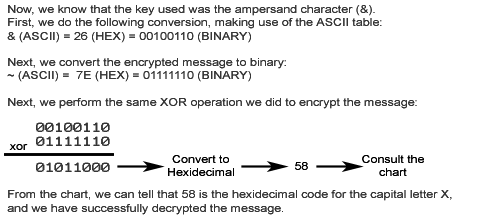
And now, a single byte example. Suppose I am very protective of the letter X, and I want to hide it from prying eyes. I will use '&' as the 8-bit long (one character) symmetric key. Here's how I encrypt the message:
Ok, so I've got an encrypted "X". How do YOU decrypt it?
But what if my key isn't the same length as the message I want to encrypt or decrypt? It's simple. You repeat the key. If we had encrypted the string XXX in the above example, we would have used the key &&&. If the message you want to encrypt is shorter than your key, you don't use the entire key in the XOR. To clarify this point, I will have another example. Suppose we had encrypted the string 1234567and we used the key ABC. We would XOR the binary representation of 1234567 with our repeated key ABCABCA. Notice the repeat went from left to right, beginning with the more significant digits -- A will be XORed with 1, B will be XORed with 2, and so on. That should be everything you need to know to get started decrypting the coordinates to the actual geocache. If you need a clue or are completely lost, I might be able to lend a hand. Just e-mail me and I'll see what I can do. Good Luck!
|
|||||||||||||||